
What is remote customer onboarding?
Remote customer onboarding introduces new customers to your product or service through digital channels and virtual interactions, without face-to-face meetings. This approach has become necessary for organizations that want to grow their customer base while maintaining personal experiences and meeting security requirements. Effective remote onboarding combines clear communication, the right technology, and engagement methods to guide customers through their first product experience and build lasting relationships.
Building Your Remote Customer Onboarding Foundation
A systematic approach to remote customer onboarding requires structured processes that guide customers through each stage of their journey using digital touchpoints. Successful remote onboarding depends on clear frameworks that work consistently while staying flexible enough to meet individual customer needs.
Step-by-Step Process Framework
The following table outlines the essential phases of remote customer onboarding with specific timelines and deliverables:
| Onboarding Phase | Timeline/Duration | Key Activities | Customer Deliverables | Success Metrics
|
|---|---|---|---|---|
| Pre-boarding | 1-2 days | Account setup, welcome communications, document collection | Welcome email, setup instructions, required documentation | Account activation rate, document submission rate |
| Welcome & Setup | 3-5 days | Initial product walkthrough, basic configuration, support introduction | Product demo, configuration guide, support contact info | First login completion, basic setup completion |
| Product Introduction | 1-2 weeks | Feature demonstrations, use case examples, initial training | Training materials, feature guides, practice exercises | Feature adoption rate, training completion |
| Integration & Practice | 2-3 weeks | Hands-on practice, workflow integration, troubleshooting | Practice scenarios, integration support, FAQ resources | Active usage metrics, support ticket volume |
| Optimization & Review | 3-4 weeks | Performance review, advanced features, feedback collection | Usage reports, optimization recommendations, feedback surveys | Customer satisfaction scores, feature utilization |
Communication Methods for Virtual Environments
Clear communication becomes critical when you remove physical presence from the onboarding process. Set up multiple communication channels and establish clear expectations about response times and availability. Use video calls for complex explanations and relationship building. Save email and messaging for documentation and quick updates.
Setting Clear Expectations and Timelines
Give customers detailed timelines that explain what will happen at each stage of the onboarding process. Include specific milestones, required actions from both parties, and realistic timeframes for completion. This transparency reduces anxiety and helps customers prepare for their responsibilities throughout the process.
Customizing Remote Interactions
Tailor the onboarding experience based on customer data, industry requirements, and stated goals. Use customer information to customize demonstrations, select relevant use cases, and prioritize features that align with their specific needs. Personal touches like customized welcome messages and industry-specific examples help maintain the human connection in digital interactions.
Removing Common Obstacles
Identify and eliminate barriers that prevent customers from progressing through the onboarding process. Simplify forms, reduce required steps, provide clear instructions, and offer multiple ways to complete tasks. Monitor where customers typically get stuck and address these bottlenecks before they become problems.
Technology Requirements for Remote Onboarding
The digital infrastructure supporting remote customer onboarding must be reliable, secure, and easy to use to ensure smooth experiences across all customer touchpoints. Organizations need connected technology systems that support communication, automation, security, and customer relationship management.
The following table compares essential tool categories for remote onboarding implementation:
| Tool Category | Primary Function | Key Features | Integration Requirements | Best Use Cases
|
|---|---|---|---|---|
| Video Conferencing | Real-time communication and screen sharing | HD video, screen sharing, recording, chat | Calendar integration, CRM connectivity | Product demos, training sessions, relationship building |
| CRM Integration | Customer data management and tracking | Contact management, activity logging, pipeline tracking | API connectivity, data synchronization | Customer journey tracking, communication history |
| Automated Workflows | Process automation and task management | Trigger-based actions, email sequences, task assignments | CRM integration, email platforms | Follow-up sequences, task reminders, progress tracking |
| Communication Platforms | Multi-channel customer communication | Email, SMS, in-app messaging, notifications | CRM integration, analytics tracking | Status updates, reminders, support communications |
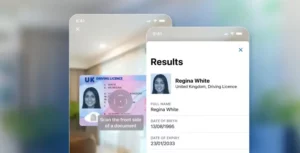
| Document Verification | Identity and document authentication | ID scanning, biometric verification, fraud detection | Compliance systems, security protocols | Identity verification, compliance documentation |
Video Conferencing and Screen Sharing Platforms
Video conferencing tools serve as the primary method for delivering personal, interactive onboarding experiences. Look for platforms that offer reliable connectivity, screen sharing capabilities, session recording, and connection with your existing technology systems. These tools enable face-to-face relationship building and complex product demonstrations that would be difficult to achieve through other channels.
Customer Onboarding Software and CRM Connection
Specialized onboarding software helps coordinate the entire customer journey by automating tasks, tracking progress, and ensuring consistent experiences. Connection with your CRM system ensures that customer data flows smoothly between systems and provides a complete view of each customer’s onboarding status and history.
Automated Workflow Tools
Automation reduces manual effort while ensuring consistent execution of onboarding processes. These tools can trigger welcome emails, schedule follow-up tasks, send reminders, and escalate issues based on predefined rules. Effective automation maintains the personal touch while improving efficiency and reducing the risk of missed steps.
Communication and Support Technologies
Multi-channel communication platforms enable organizations to reach customers through their preferred channels while maintaining consistent messaging. These systems should support email, SMS, in-app notifications, and chat functionality, with the ability to track engagement and response rates across all channels.
Document Verification and Security Tools
Remote onboarding requires strong identity verification and document authentication capabilities to maintain security and compliance standards. These tools must balance thorough verification with user experience, providing secure processes that don’t create unnecessary barriers for legitimate customers.
Building Engaging Virtual Onboarding Experiences
Maintaining customer engagement in a remote environment requires deliberate strategies that compensate for the lack of physical presence and in-person interaction. Successful virtual onboarding experiences combine interactive elements, self-service resources, and relationship-building techniques to keep customers motivated and progressing through their journey.
Interactive Demos and Product Walkthroughs
Create engaging product demonstrations that allow customers to actively participate rather than passively observe. Use screen sharing to guide customers through actual product interfaces, encourage questions and exploration, and provide hands-on practice opportunities during live sessions. Interactive demos help customers understand product value while building confidence in their ability to use the solution effectively.
Self-Service Resources and Knowledge Bases
Develop complete self-service resources that customers can access at their own pace and convenience. Include video tutorials, step-by-step guides, FAQ sections, and searchable knowledge bases that address common questions and use cases. These resources should complement live interactions rather than replace them, providing customers with reference materials they can return to as needed.
Multi-Channel Communication Planning
The following table outlines strategic approaches for different communication channels during remote onboarding:
| Communication Channel | Primary Purpose | Optimal Timing | Content Type | Engagement Level
|
|---|---|---|---|---|
| Documentation and formal communications | Throughout process | Welcome messages, guides, confirmations | Passive | |
| Video Calls | Relationship building and complex explanations | Key milestones | Demos, training, Q&A sessions | Interactive |
| In-app Messaging | Contextual guidance and tips | During product usage | Feature highlights, usage tips | Interactive |
| SMS/Text | Urgent reminders and quick updates | Time-sensitive moments | Appointment reminders, status updates | Passive |
| Phone Calls | Problem resolution and personal connection | When issues arise | Troubleshooting, relationship building | Collaborative |
| Chat/Messaging | Quick questions and support | As needed | FAQ responses, quick help | Interactive |
Progress Tracking and Feedback Systems
Implement systems that allow both customers and your team to track onboarding progress and identify areas where additional support may be needed. Provide customers with dashboards or progress indicators that show their advancement through the onboarding process. Regularly collect feedback through surveys, check-in calls, or informal conversations to identify improvement opportunities.
Building Trust and Relationships Remotely
Establish personal connections through consistent communication, reliable follow-through on commitments, and proactive support. Assign dedicated onboarding specialists who can build relationships with customers over time. Use video calls strategically to create face-to-face interactions that help humanize the remote experience and build trust.
Final Thoughts
Remote customer onboarding success depends on combining structured processes, appropriate technology, and engagement strategies that maintain personal connections in digital environments. Organizations must invest in robust technology stacks that support communication, automation, and security while ensuring that human touchpoints remain central to the customer experience. The key is balancing efficiency with personalization, using automation to handle routine tasks while preserving meaningful interactions for relationship building and complex problem-solving.
When implementing document verification as part of your remote onboarding technology stack, solutions like Microblink demonstrate how AI-powered identity verification can streamline the process while maintaining security standards. Their comprehensive platform combines document scanning, biometric verification, and advanced fraud detection capabilities—including deepfake and synthetic identity detection—specifically designed to address the heightened security risks inherent in remote customer interactions. This integration of specialized identity verification technology illustrates how organizations can maintain compliance and security standards while delivering seamless remote onboarding experiences that build trust from the first interaction.